
How to Use Claude for Your Insurance Agency: A Practical Guide
Key Takeaways
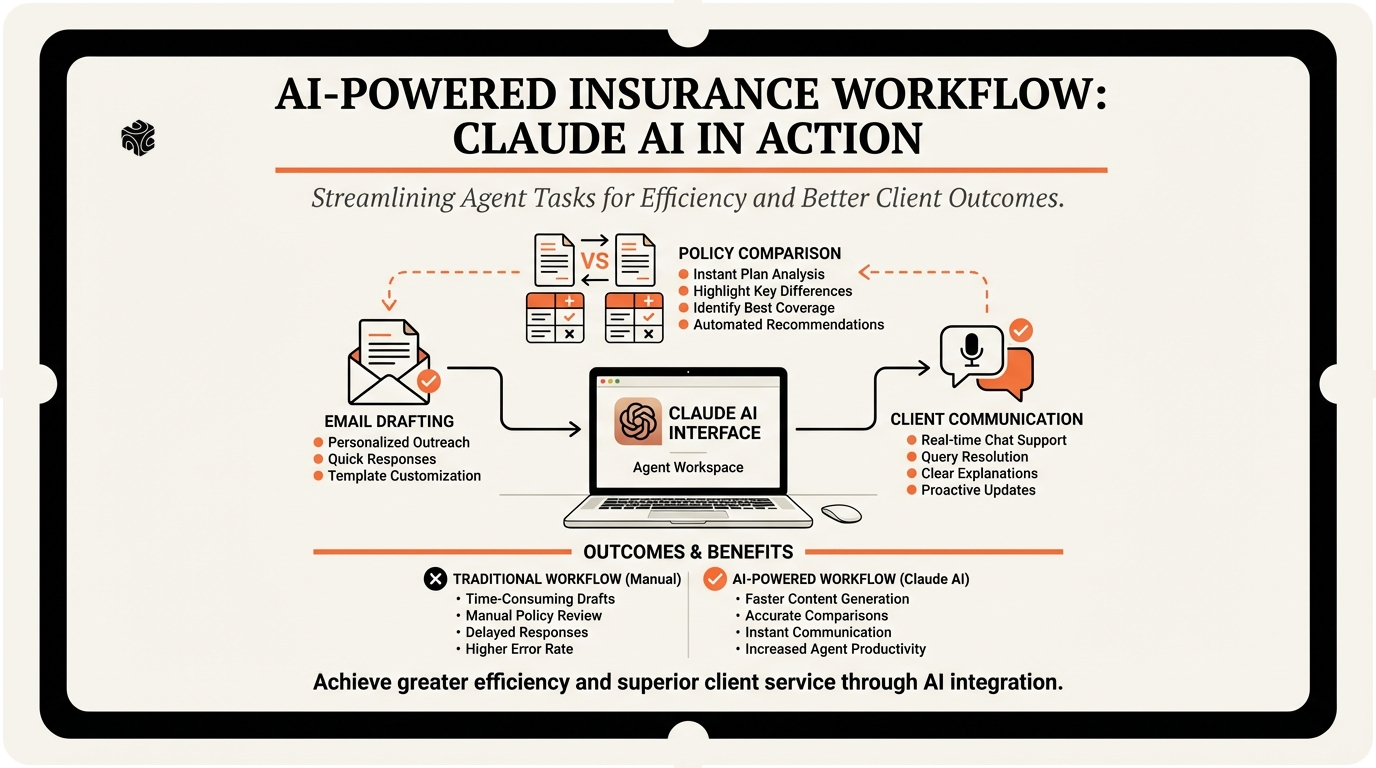
- ✓ Claude works best when you provide specific context about your agency, clients, and situation rather than asking generic questions.
- ✓ Email drafting time drops from 15 minutes to under 2 minutes when you use structured prompts and build a template library.
- ✓ Policy comparison analysis that normally takes 30-45 minutes can be completed in under 2 minutes with the right Claude prompts.
- ✓ Use Claude as a translation tool to convert complex insurance concepts into client-friendly language that builds trust and understanding.
- ✓ Advanced techniques like conversation threading and custom prompt libraries maximize Claude's value for busy insurance agencies.
Claude AI is becoming a game-changer for insurance agencies across the North Shore. I've worked with agencies in Lake Forest, Highland Park, and Winnetka that are using Claude to cut their administrative work in half. The best part? You don't need any technical background to get started.
As an AI consultant who's helped 97+ agencies implement AI solutions, I see the same pattern everywhere. Agents waste hours on repetitive tasks that Claude can handle in minutes. Email drafts that take 20 minutes. Policy comparisons that eat up entire afternoons. Client follow-ups that pile up on your desk.
This guide walks you through exactly how to use Claude for the four biggest time-sinks in your agency: email drafting, policy comparison, client communication, and meeting prep. I'll show you the exact prompts I give my clients at Bace Agency, plus the workflows that actually work in practice.
No fluff. No theory. Just the practical steps you need to start saving hours this week.
Setting Up Claude for Insurance Work
First things first. You need to understand what Claude is and isn't. Claude is Anthropic's AI assistant. Think of it as a very smart intern who never sleeps, never takes vacation, and processes information faster than anyone on your team.
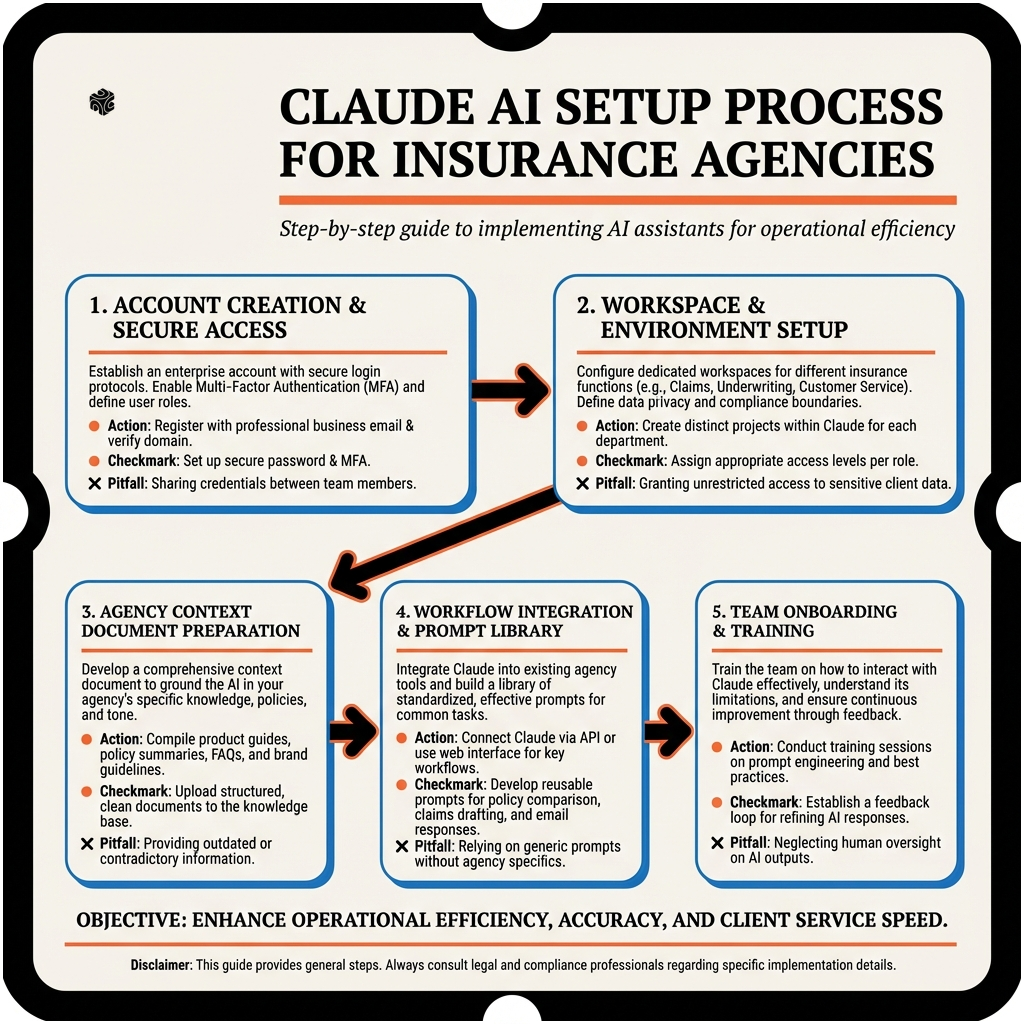
Getting started is simple. Go to claude.ai and create an account. The free tier gives you enough messages to test everything in this guide. If you're processing more than 50 conversations per day, upgrade to Claude Pro for $20/month. Worth every penny for a busy agency.
Here's where most agents mess up: they try to use Claude like Google. Wrong approach. Claude works best when you give it context and specific instructions. Think of it like training a new employee. The more detail you provide, the better results you get.
Let me show you the setup I use with agencies in Evanston and Glencoe. Create a document with your agency's basic information: your specialties (auto, home, commercial, life), your target clients, your tone of voice, and common scenarios you deal with. Keep this handy. You'll reference it in every Claude conversation.
For example, if you're a State Farm agency in Wilmette focusing on families and small businesses, your context document might say: "We're a State Farm agency serving families and small businesses on Chicago's North Shore. Our tone is professional but friendly. We specialize in bundling auto and home insurance for cost savings. Common client concerns include coverage gaps and premium increases."
The key is being specific. Don't just say "insurance agency." Tell Claude your exact situation. This context makes every interaction more relevant and useful.
One more setup tip: bookmark Claude in your browser. Put it right next to Applied Epic or whatever agency management system you use. The easier it is to access, the more you'll use it. And the more you use it, the more time you'll save.
Email Drafting That Actually Sounds Like You
Email drafting is where Claude really shines. I've watched agents in Lake Bluff cut their email writing time from 15 minutes per message to under 2 minutes. The trick is using the right prompts and teaching Claude your voice.
Start with this basic prompt structure: "I'm an insurance agent writing to [client type] about [situation]. My tone is [professional/friendly/concerned]. Please draft an email that [specific goal]." Then paste your context document at the end.
Let's say a client in Kenilworth just had a fender-bender and needs to file a claim. Here's the exact prompt I'd use: "I'm a State Farm agent writing to a long-term client who just had a minor car accident. My tone is supportive and helpful. Please draft an email that walks them through the claims process, reassures them about their coverage, and offers to help with next steps. Here's my agency context: [paste your context document]."
Claude will generate something like this: "Hi Sarah, I just heard about your accident this morning. I'm so glad you're okay – that's what matters most. I wanted to reach out right away to help you through the claims process. Your comprehensive coverage will handle the damage to your vehicle, and since you have our accident forgiveness feature, this won't impact your rates. Here's what we need to do next: [step-by-step process]. I'll personally handle your claim to make this as smooth as possible. Call me directly at [number] if you have any questions. We've got your back. Best regards, [Your name]."
The email sounds natural because you gave Claude specific context about your relationship with the client and your agency's approach. But here's the advanced technique: save your best Claude outputs and use them as templates for future prompts.
For renewal reminders, I tell agencies to create a library of Claude-generated emails for different scenarios. Auto renewal for a family client. Commercial policy renewal for a restaurant. Life insurance review for someone approaching retirement. Build this library over time, and you'll have perfect emails ready in seconds.
Here's another powerful use case: difficult conversations. When a client's rates go up or a claim gets denied, Claude can help you craft emails that deliver bad news professionally. The prompt: "I need to inform a client that their auto insurance premium is increasing by 15% due to a recent claim. Help me write an email that explains the increase, shows empathy, and offers solutions to reduce their costs."
Claude excels at this because it can balance being direct about the facts while maintaining a caring tone. Something human agents often struggle with when they're stressed or busy.
Policy Comparison Made Simple
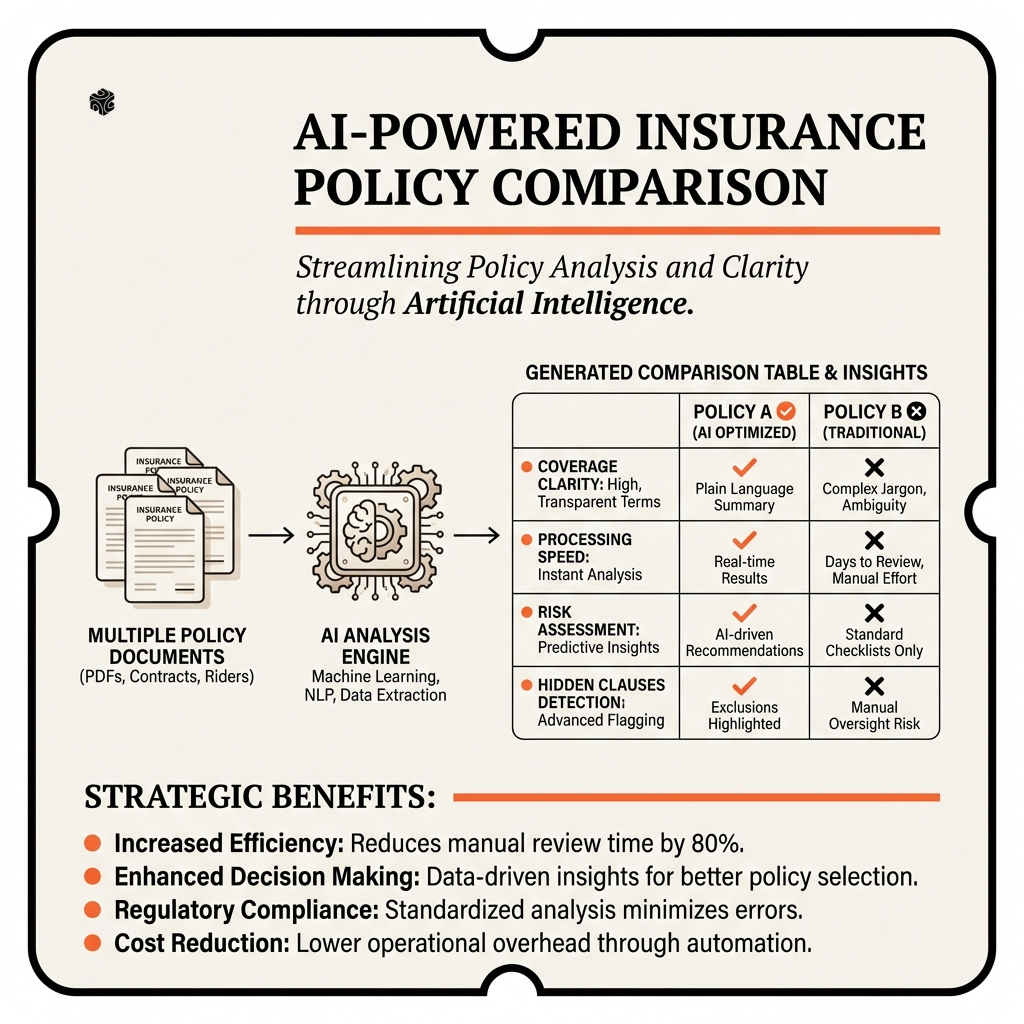
Policy comparison is where Claude becomes your secret weapon. I've seen agencies in Highland Park use Claude to analyze competing quotes in minutes instead of hours. The key is structuring your comparison requests properly.
Here's the framework that works: "I need to compare insurance policies for [client type]. Please analyze these options and create a clear comparison focusing on [coverage differences/cost differences/benefits]. Present this in a format I can share with my client."
Let's walk through a real example. You have a restaurant owner in Lake Forest considering three commercial policies. Feed Claude the policy summaries and ask: "I need to compare these three commercial insurance policies for a restaurant client. Focus on general liability coverage, property protection, and business interruption benefits. Create a simple table showing the key differences and recommend which policy offers the best value."
Claude will analyze the policies and create something like this:
| Policy Feature | Policy A | Policy B | Policy C |
|---|---|---|---|
| General Liability | $2M per occurrence | $1M per occurrence | $2M per occurrence |
| Property Coverage | Replacement cost | Actual cash value | Replacement cost |
| Business Interruption | 12 months | 6 months | 12 months |
| Annual Premium | $3,200 | $2,800 | $3,400 |
But Claude goes further. It explains why Policy A might be the best choice despite not being the cheapest: "Policy A offers the best balance of coverage and cost. While Policy B is $400 cheaper annually, the reduced property coverage (actual cash value vs. replacement cost) could leave your client significantly underinsured. The $200 difference between Policy A and C isn't justified by C's minimal coverage improvements."
This analysis would take you 30-45 minutes to do manually. Claude does it in under 2 minutes. Plus, the comparison table is ready to send directly to your client or include in your presentation.
Here's an advanced technique I teach in my AI training sessions: use Claude to identify coverage gaps. Upload two policies and ask: "Compare these policies and identify any coverage gaps or areas where one significantly outperforms the other. Focus on potential risks my client might not consider."
Claude will spot things like earthquake exclusions, cyber liability differences, or business personal property limits that you might miss during a quick review. This gap analysis helps you provide better recommendations and avoid coverage issues down the road.
Client Communication That Builds Trust
Client communication is where many agencies lose business. Not because they're bad agents, but because they're terrible communicators. Claude fixes this by helping you explain complex insurance concepts in simple terms that clients actually understand.
The secret is using Claude as a translation tool. Take your technical insurance knowledge and have Claude convert it into client-friendly language. Here's the prompt structure: "Explain [insurance concept] to a [client type] in simple terms. Focus on [what they care about] and avoid insurance jargon."
For example, you're explaining umbrella insurance to a wealthy family in Winnetka. Your prompt: "Explain umbrella insurance to a high-net-worth family. Focus on asset protection and liability risks they might not consider. Avoid insurance jargon and use examples relevant to their lifestyle."
Claude responds with something like: "Think of umbrella insurance as an extra layer of protection for everything you've worked hard to build. Your auto and home insurance have limits – typically $300,000 to $500,000. But what if someone sues you for $2 million after a serious accident? Without umbrella coverage, they could go after your savings, investment accounts, even future earnings. For $300-400 per year, a $1 million umbrella policy protects all your assets. It's like having a financial firewall around your family's wealth."
This explanation works because Claude removes the jargon ("excess liability coverage," "underlying limits," "occurrence basis") and focuses on what the client cares about: protecting their wealth and family.
Here's another powerful use case: claim explanations. When a client's claim gets denied or partially covered, use Claude to help explain why in terms they'll understand. The prompt: "Help me explain to a homeowner why their water damage claim was denied due to lack of maintenance. Make it educational, not defensive, and suggest steps to prevent future issues."
Claude helps you turn a potentially confrontational conversation into a teaching moment. Instead of just saying "maintenance exclusion," you explain how regular upkeep prevents small issues from becoming big problems, and how insurance is designed to cover sudden, accidental events, not gradual deterioration.
Client newsletters are another Claude goldmine. Many agencies struggle with consistent communication because writing takes too long. Use this prompt: "Write a 200-word insurance tip for my monthly client newsletter. Focus on [seasonal topic] and include one specific action they can take this month. Keep it conversational and helpful."
For October: "As temperatures drop on the North Shore, your pipes face their biggest threat of the year: freezing. A burst pipe can cause thousands in damage and major headaches during the holidays. Here's your November to-do: locate your home's main water shutoff valve and make sure everyone in your family knows where it is. If pipes freeze, shutting off the water quickly can prevent a small problem from becoming a big insurance claim. Bonus tip: let faucets drip slightly during extremely cold nights – moving water doesn't freeze as easily. Takes two minutes now, could save you thousands later."
This type of content builds trust because you're helping clients prevent problems, not just selling them coverage. Claude helps you create this helpful content consistently without spending hours writing.
Meeting Prep That Makes You Look Like a Pro
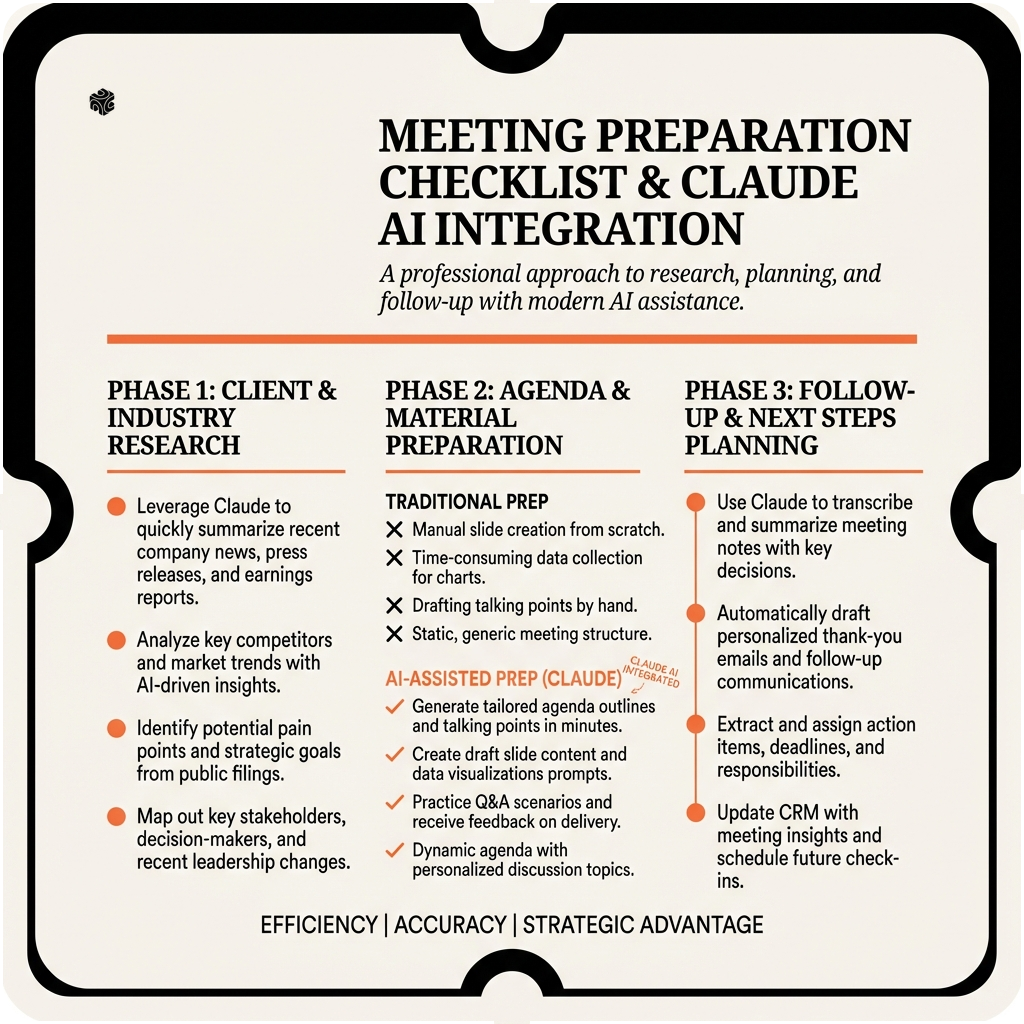
Meeting preparation separates good agents from great ones. Claude can help you walk into every client meeting fully prepared, whether it's a new client prospect in Glencoe or a policy review with a long-term client.
Start with client research prompts. Before meeting a new prospect, use Claude to analyze their business or situation. The prompt: "I'm meeting with [client type] to discuss [insurance needs]. Based on this industry/situation, what are the most common risks and insurance concerns they likely face? What questions should I ask to uncover their specific needs?"
For a new restaurant client: "I'm meeting with a restaurant owner to discuss commercial insurance. Based on the restaurant industry, what are the most common risks and insurance concerns they likely face? What questions should I ask to uncover their specific needs?"
Claude responds with insights like: "Restaurant owners typically worry about general liability (slip-and-fall accidents), property damage (kitchen fires, equipment breakdown), workers' compensation (high injury rates), business interruption (health department closures), and liquor liability if they serve alcohol. Key questions: How many employees? Do you serve alcohol? What's your busiest season? Have you had any claims or violations? What's your biggest fear about running the restaurant?"
This preparation helps you ask better questions and position yourself as someone who understands their business, not just someone trying to sell insurance.
For existing clients, use Claude to review their current coverage before annual meetings. Upload their policy summary and ask: "Review this client's current coverage and identify potential gaps or improvement opportunities. Consider their business growth, industry changes, and common risks they might not be addressing."
Claude might identify that their business personal property coverage hasn't increased despite adding new equipment, or that they don't have cyber liability coverage despite processing credit cards online. These insights help you provide proactive service instead of just renewing existing policies.
Here's an advanced technique: use Claude to practice difficult conversations. Let's say a client's premium is increasing significantly, and you know they'll be upset. Ask Claude to role-play the conversation: "Help me practice explaining a 25% premium increase to a long-term client. Play the role of an angry client and help me work through their objections professionally."
Claude will simulate client objections like "I've been with you for 10 years and never had a claim!" or "Your competitor quoted me 30% less!" and help you practice responses that acknowledge their frustration while explaining the situation clearly.
Meeting follow-up is where Claude really shines. After every client meeting, use this prompt: "Based on this meeting discussion [summarize key points], help me create a follow-up action plan. What should I research, what quotes do I need to get, and what follow-up communication should I send?"
This ensures nothing falls through the cracks and every client feels like you're actively working on their behalf. The agents I work with through Bace Agency's automation services use this process to stay organized and provide consistent follow-up that impresses clients.
Advanced Claude Techniques for Insurance Agencies
Once you've mastered the basics, these advanced techniques will take your Claude usage to the next level. These are the strategies I share with agencies that want to maximize their AI investment.
First: conversation threading. Claude remembers your entire conversation, so build on previous responses instead of starting fresh each time. If Claude helps you draft a policy comparison, follow up with: "Now create a presentation slide summarizing these key differences" or "Write a follow-up email I can send to the client with this comparison."
This threading saves time and creates more cohesive workflows. Instead of three separate Claude conversations, you handle the entire client interaction in one thread.
Second: custom prompt libraries. Create a document with your best-performing prompts for common scenarios. Email templates, policy comparisons, meeting prep checklists. When new situations arise, modify existing prompts instead of writing from scratch. This consistency improves your results and speeds up your workflow.
Third: multi-perspective analysis. For complex client situations, ask Claude to analyze from different angles. "Evaluate this client's insurance needs from three perspectives: risk management, cost optimization, and growth planning." This comprehensive analysis helps you provide more strategic advice.
Fourth: regulatory compliance support. Insurance regulations change frequently. Use Claude to help you understand new requirements: "Explain the new Illinois data breach notification law and how it affects my commercial clients' cyber liability needs." Claude can break down complex regulations into actionable advice.
Fifth: competitive intelligence. When clients bring competitor quotes, use Claude to analyze positioning strategies: "A client received this quote from a competitor. Help me understand their pricing strategy and identify ways to demonstrate superior value without just competing on price."
The key to advanced Claude usage is thinking beyond simple question-and-answer. Use it as a collaborative partner that helps you think through complex situations, not just a tool that answers basic questions.
Error prevention is crucial with AI. Always fact-check policy details, coverage limits, and regulatory information. Claude is excellent for structure, analysis, and communication, but you're still the insurance expert. Use Claude to make your expertise more accessible and efficient, not to replace your professional judgment.
Integration with your existing tools is where the real power lies. If you use Applied Epic, Redtail, or other agency management systems, develop workflows where Claude helps you process information before it goes into your primary systems. Draft emails in Claude, then copy them into your CRM. Create policy comparisons in Claude, then save them in your client folders.
The agents seeing the biggest impact from Claude aren't just using it occasionally – they're building it into their daily workflows. Morning email review, pre-meeting preparation, post-appointment follow-up. Make Claude part of your standard operating procedures, and watch your productivity soar while your client service improves.
Remember: Claude is a tool that amplifies your expertise, not a replacement for it. The agents who get the best results use Claude to spend less time on routine tasks and more time on high-value activities like relationship building, strategic planning, and complex problem-solving. That's where you create real value for your clients and your business.
Ready to transform how you run your insurance agency? I've helped dozens of North Shore agencies implement AI solutions that save hours every week while improving client service. At Bace Agency, we specialize in practical AI implementation that works in the real world. Book a free 30-minute AI audit to see exactly how Claude and other AI tools can streamline your specific workflows and boost your agency's efficiency.
Frequently Asked Questions
How much does Claude cost for insurance agencies? +
Claude offers a free tier that's sufficient for testing and light usage. Claude Pro costs $20/month and provides significantly more message capacity. For busy agencies processing 50+ AI conversations daily, the Pro version pays for itself in time savings within the first week.
Is Claude secure enough for insurance client information? +
Claude is built with enterprise-level security, but you should never input sensitive client data like social security numbers or policy numbers. Instead, use Claude for general communication drafting, process analysis, and educational content. Always follow your agency's data privacy policies.
Can Claude replace my agency management system? +
No, Claude is not a replacement for Applied Epic, Redtail, or other agency management systems. Think of Claude as a productivity assistant that helps you draft better emails, analyze policies faster, and prepare for meetings more effectively before inputting information into your primary systems.
How accurate is Claude for insurance information? +
Claude is excellent for structure, communication, and analysis, but you should always verify insurance-specific details, coverage limits, and regulatory information. Use Claude to make your expertise more efficient and accessible, not as your primary source of insurance knowledge.
What's the learning curve for using Claude effectively? +
Most insurance agents see immediate benefits within their first week of using Claude. The basic functions (email drafting, policy comparison) take just a few sessions to master. Advanced techniques like conversation threading and custom prompt libraries develop over 2-3 weeks of regular use.
Want to see how AI fits in your firm?
Book a free 30-minute AI audit. No obligation, no pitch deck.
Book a Free AI Audit →