
Why Your Team Quietly Ignores the AI You Bought
The software is rarely the problem. When nobody uses the tools, the rollout is almost always the reason.

Key Takeaways
- ✓ The tool is rarely the reason adoption fails. Most firms buy the software, skip the rollout, and then wonder why the team quietly went back to the old way.
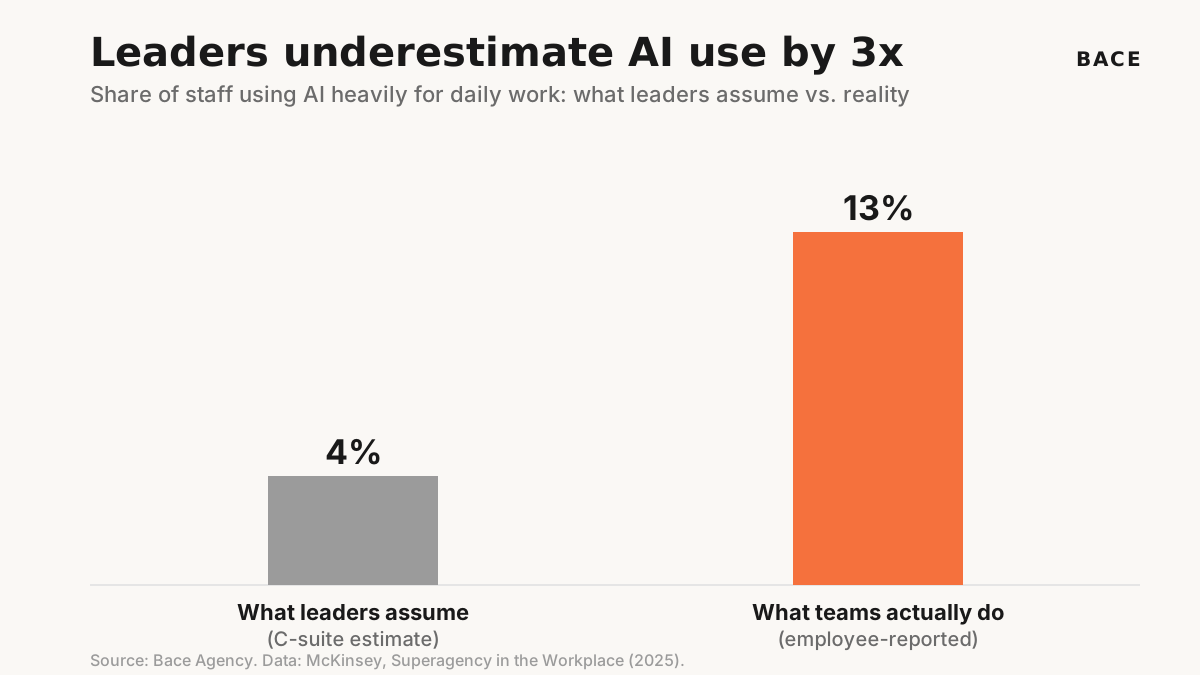
- ✓ Leaders badly underestimate how much their people already use AI. McKinsey found the C-suite guesses around 4 percent of staff use AI heavily, when the real figure is closer to 13 percent, roughly triple.
- ✓ Training is the gap, not interest. In McKinsey's research, about half of employees report minimal or no AI training, and formal training ranks as the single most important factor that would raise their use of it.
- ✓ Adoption is a process you design. One real task, one owner, one short training on the actual workflow, one visible win. Then expand from there.
You bought the tools. Nobody uses them. You are not alone, and the software is almost never the reason.
I build AI systems for firms across the North Shore. The most common thing I get called in to fix is not a broken tool. It is a paid license that sits unused. The owner signed everyone up, sent one email, and three months later the only person who opens it is the owner.
The instinct is to blame the product, or the team, or AI in general. The real problem sits upstream of all three. A tool does not change how a firm works. A rollout does, and most firms never run one.
The Software Was Never the Problem
The tools are good and getting better. A capable model can draft a letter, sort a stack of documents, or pull numbers out of a PDF faster than a junior associate. It still needs your team's final judgment. So when adoption stalls, the temptation is to go shopping for a better tool. That almost never works.
People keep their old habits unless the new way is clearly easier and someone shows them how. A login and a launch email do not clear that bar. This is why so much corporate AI spending shows nothing for it. HBR contributors argue that stalled adoption traces back to missing process and training, not weak technology, and a widely cited MIT analysis (the NANDA initiative's The GenAI Divide, reported by Fortune) found that the large majority of company AI pilots delivered no measurable impact. Treat that number as directional, not precise. The pattern is the same at a 12-person firm as it is at a Fortune 500.
Here is the part owners miss. Your team is probably already using AI. Just not the thing you bought. They are typing questions into a chatbot on their phone between meetings and quietly pasting the answers into their work. McKinsey's 2025 workplace report found leaders guess around 4 percent of staff use AI heavily, when the real number is roughly triple that. The appetite is there. What is missing is a safe, firm-approved way to point it at real work.
"A tool nobody opens is not a failed technology. It is a failed rollout. The fix is almost never a better tool."
Michael Pavlovskyi, Bace AgencyI have walked into this exact situation more times than I can count, and the diagnosis holds nearly every time.
Why This Matters for North Shore Firms
A big company can absorb a wasted year of unused licenses. A 15-person insurance agency or a small law firm cannot. When the spend produces nothing, the lesson the owner takes away is that AI does not work here, and the firm sits out the next two years while competitors pull ahead.
Small firms also have one advantage the big ones do not, and it cuts both ways. The partner sets the tone. If the owner of a Lake Forest practice uses the tool every day and talks about it, the team follows. If the owner bought it and never opened it, no training program will save the rollout. Adoption at a small firm is led from the front or it does not happen.
The firms that get this right do not look special. In our own work building custom AI workflows for North Shore practices, the difference between a system that sticks and one that dies is rarely the technology itself. One North Shore P&C insurance agency we worked with went from AI-skeptical to 37 percent more productive in eight weeks, because the rollout was built around their real renewal workflow, not around a feature list. The whole team was using it within three weeks, and roughly 22 hours of weekly data entry came off their plate. The full account is in our case studies.
Pick One Real Task, Not a Platform
Adoption starts when AI does one annoying job better than the old way, in front of the person who hates that job.
The fastest way to kill adoption is to hand the team a powerful, open-ended tool and say "use this for whatever." Nobody knows where to start, so nobody starts. The fix is to pick one recurring task everyone already dislikes and prove the tool on that, and only that, for the first few weeks.
Choose by pain, not by sophistication. For an insurance agency it might be re-keying renewal data between systems. For a law firm it is often first-draft client intake. For a financial advisor it is pulling figures out of quarterly statements. These are tasks where a wrong first pass costs nothing, because a person was going to check the output anyway, which makes them the safe place to build the habit. That is the same logic behind the workflow automation work I build first for most firms.
SAMPLE CLAUDE PROMPT
"Here is a list of recurring tasks at my firm and roughly how long each takes per week. Help me pick the single best first task to move to AI. Rank by three things: how much my team dislikes it, how repetitive it is, and how low the cost is if a first draft is wrong because a person reviews it anyway. Recommend one task to start with and explain why in plain terms."
Give the Tool an Owner
Software with no owner becomes software no one opens. Name a person, not a department.
Every stalled rollout I have seen has the same hole. No one owns it. The license belongs to "the firm," which means it belongs to nobody. The fix is to name one person who is responsible for the tool actually getting used, and it should not be the most technical person. It should be someone inside the workflow who other people trust and ask for help.
That owner does three small things. They answer the "how do I" questions so people do not give up in private. They collect what is working and share it. And they report back to the partner once a week on who is using it and what is in the way. This is light work, maybe an hour a week, and it is the difference between a habit forming and a tool dying. If your firm has no one who can play that role, that is exactly the gap a short AI consulting engagement is meant to fill.
SAMPLE CLAUDE PROMPT
"Write a one-page brief for the person who will own AI adoption for one tool at my professional-services firm. Include their weekly responsibilities, the three questions they should ask the team each week, a simple way to track who is actually using the tool, and what they should report to the owner. Keep it practical and short enough that a busy person will actually follow it."
Train on the Workflow, Not the Software
People do not need a feature tour. They need to watch their own task get done faster.
Most AI training fails because it teaches the software instead of the job. A walkthrough of every menu and setting tells your paralegal nothing about how to draft an intake summary on a real matter. Training that sticks uses your firm's actual work. You sit down with the real renewal, the real intake, the real statement, and you run it through together until the person can do it alone.
This is where the McKinsey training gap matters. The interest is already there: about half of employees report minimal or no AI training, and formal training is the factor they name most often as the thing that would raise their use of it. Close that gap with short, hands-on sessions tied to real tasks and adoption follows. A North Shore family office we worked with reached 100 percent team adoption in four weeks this way, by training on the work the team already did rather than on the tool in the abstract. They reclaimed roughly 32 hours of manual work a week across eight automated processes, with deal memos dropping from three-plus hours to about 40 minutes. The numbers are in our case studies. That is the whole idea behind how I run team training.
SAMPLE CLAUDE PROMPT
"Design a 30-minute hands-on training session to teach one of my staff how to do a specific recurring task with AI. The task is [describe the task]. Build it around a real example from start to finish, not a tour of features. Include what I show first, the exact steps the person practices, and one simple check they run to confirm the output is right before they use it."
How to Get Started
You do not need a budget or a committee to fix a stalled rollout. You need to run the small process the firm skipped the first time. Here is the order I use.
Find the one task worth winning first
List your recurring tasks and pick the one the team most dislikes where a wrong first draft is low cost. That is your beachhead. Ignore everything the tool could theoretically do and focus on this single job.
Name an owner and set a weekly check-in
Give one trusted person inside the workflow responsibility for the tool getting used. Have them answer questions, collect what works, and report to you each week on who is using it and what is in the way.
Train on real work, then expand
Run short sessions on the actual task until people can do it alone. Once that one job is a habit and the win is visible, add the next task. Adoption compounds when it is earned one task at a time.
What This Does Not Replace
Getting your team to use AI is not the same as letting AI run unchecked. The rollout still ends at a human gate. The tool drafts and organizes, and a person reviews and signs anything that carries real downside or goes out under your firm's name. Adoption means more people doing the safe drafting work, not fewer people checking the high-stakes output.
It also does not mean forcing a tool that genuinely does not fit. Sometimes the team ignores the software because it is the wrong software for how the firm actually works. Part of an honest rollout is being willing to drop a tool that adds steps instead of removing them. The goal is the work getting easier, not the logo on the screen.
The firms that move first on this will not be the ones with the biggest budgets. They will be the ones that picked a single task, named one owner, and trained on real work while everyone else kept shopping for a better tool. That head start compounds quietly, one habit at a time, and a year from now it looks like a moat.
If you want a quick read on where your firm stands before you change anything, the AI Readiness Quiz takes about five minutes. And if you already bought a tool that is collecting dust, the free 30-minute AI audit is the fastest way to find out whether the problem is the rollout or the tool, and what it takes to get your team actually using what you paid for. Available in person on the North Shore or by video, no obligation.
Frequently Asked Questions
We rolled out an AI tool and nobody uses it. Did we buy the wrong one? +
Usually not. The most common reason a tool goes unused is that the firm bought a license but never ran a rollout: no single first task, no owner, no training on real work. Fix the rollout before you go shopping for a different tool. The software is rarely the actual problem.
How do I know if my team is already using AI on their own? +
Assume they are. McKinsey found leaders underestimate heavy employee AI use by roughly three times. People are often using a chatbot on their phone and pasting answers into their work without saying so. The job is to give them a safe, firm-approved way to point that interest at real tasks.
What is the single best first task to put on AI? +
Pick the recurring task your team most dislikes where a wrong first draft costs nothing, because a person reviews it anyway. For agencies that is often renewal data entry, for law firms client intake drafts, for advisors pulling numbers out of statements. Win one task, build the habit, then expand.
Why does AI training so often fail to change anything? +
Because most training teaches the software instead of the job. A tour of menus does not help someone do their actual work faster. Training that sticks runs a real task from start to finish until the person can do it alone. About half of employees report minimal or no AI training, and they name training as the top thing that would raise their use, so even basic hands-on sessions move the needle.
Do I need to be technical to lead this at my firm? +
No. The rollout is a process question more than a software question: one task, one owner, one short training, one visible win. The owner you name should be a trusted person inside the workflow, not the most technical person. If no one can play that role, a short consulting engagement is built to fill exactly that gap.
Related Articles

Small North Shore Firms Are Beating Big Ones to AI
While a national firm spends a year debating AI strategy, the small practice down the street already answers clients faster. The gap compounds every week.

What North Shore Firms Should Not Automate
Most AI consultants will automate anything you point at. Here is the short list I tell clients to leave alone.

What Anthropic's Valuation Means for Small Firms
Anthropic just became the most valuable AI startup at a $965 billion valuation. The fad question is closed. The useful question is where AI fits in your firm, and where it does not.
About the author

Written by
Michael Pavlovskyi
Founder, Bace Agency
Michael builds custom Claude and GPT workflows for insurance agencies, law firms, and PE firms on Chicago's North Shore. Speaker at Northwestern and Lake Forest College on practical AI adoption for professional services.
Connect on LinkedInSee it in your firm
Book an audit.
A free 30-minute AI audit. No obligation, no pitch deck.
Book a free AI audit