
Claude Skills Give a Law Firm One AI Standard
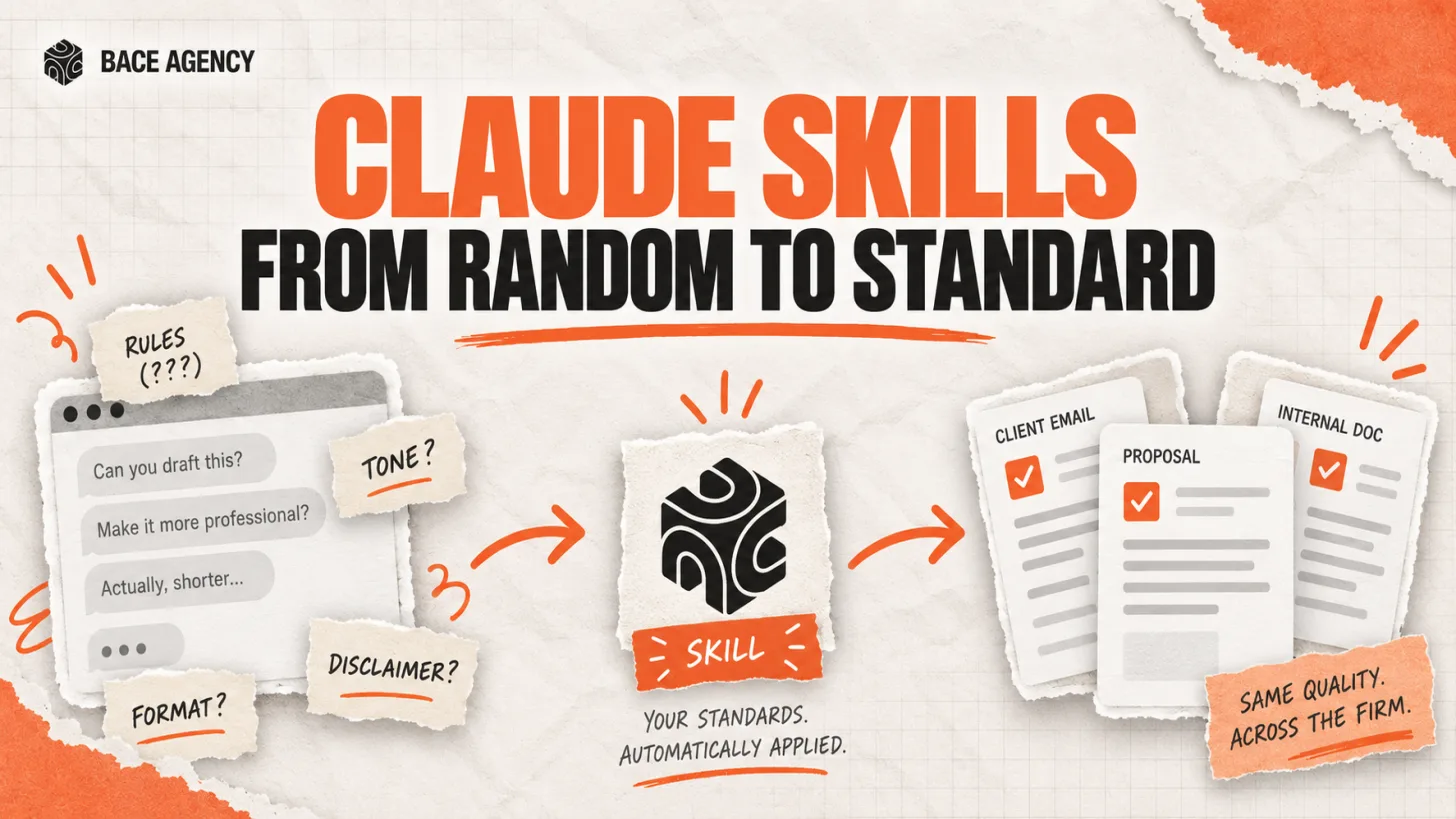
One associate gets sharp drafts, another gets generic filler from the same tool. The gap is a standard nobody wrote down.

Key Takeaways
- ✓ AI gives one person a sharp draft and another generic filler because the rules that shape a good result live in one person's head, not in the tool.
- ✓ A Claude Skill is a written set of your rules that Claude applies automatically, without reminders, so the standard no longer depends on who is at the keyboard.
- ✓ For a law firm, a Skill can lock in a conservative tone, a ban on categorical wording, and a mandatory attorney-review disclaimer on every document.
- ✓ Setting up one Skill is easy. Wiring a firm's standards into AI so they hold evenly across the whole team is the harder job, and the one that separates an experiment from a system.
Claude Skills for law firms solve a problem every practice that has tried AI already knows. One associate at a Highland Park firm gets excellent, on-voice text out of Claude. Another, using the same tool, gets watered-down filler. The tool did not change between them. What changed is invisible: one person quietly taught the AI the firm's rules, and the other did not.
That gap is why AI feels unreliable across a firm even when it works beautifully for one person. This piece explains what a Skill actually is, why output swings from desk to desk, and how a firm turns one lawyer's good habits into a standard that holds in every document.
What Is a Claude Skill?
A Claude Skill is a written set of instructions and standards that Claude loads and applies automatically when it is relevant, without anyone re-explaining them. Anthropic defines a Skill as a reusable resource that gives Claude domain-specific expertise, and notes the key difference from a prompt: a prompt is a one-off instruction for a single conversation, while a Skill loads on demand so you never repeat the same guidance again. You can read the full definition in Anthropic's Agent Skills documentation.
The plain-language version: if a Claude Project is a working room stocked with your documents, a Skill is the set of working standards that switches on by itself. The Project answers what to know about your firm. The Skill answers how the work should actually be done. Anthropic goes deeper on the design in its engineering write-up on Agent Skills.
Why Does AI Answer Differently Every Time?
Because the quality lives in the instructions, and most people give the AI different instructions every time or none at all. The associate who gets great drafts is manually explaining the rules, the tone, the format, and the required disclaimers on every request. The one who types "write a client email" and hits enter gets a generic draft. Same tool, two results, and the difference is effort no one sees.
Even the careful approach does not scale. The rules live in one person's memory, get repeated case by case, and vanish the moment someone else sits down at the AI. Quality swings across the firm, and AI starts to look like a gamble rather than a tool. A Skill fixes the root cause: it writes the rules down once, in a place the AI reads on its own, so the good version is the only version.
How a Skill Becomes the Firm's Standard
The value of a Skill is that the standard stops depending on any one person. A law practice can lock in a conservative tone, a refusal to use categorical wording, and a mandatory disclaimer that the document requires review by a licensed attorney. That will hold in every draft, no matter who prepared it. A requirement that used to need someone watching for it becomes built in by default, and quality no longer rests on a person not forgetting.
This is the exact line between a firm that experiments with AI and a firm that can rely on it. It is also where a firm using AI casually, without a shared standard, quietly loses ground to one that built the standard once and gave it to the whole team.
| Aspect | Typed prompt each time | A Claude Skill |
|---|---|---|
| Where the rules live | One person's memory | Written down, read by Claude |
| Applied when | Only if remembered | Automatically, every time |
| Survives staff change | No, leaves with the person | Yes, stays with the firm |
| Quality across the team | Swings desk to desk | Holds evenly |
Use Case 1: A Mandatory Review Disclaimer on Every Document
Make the compliance line automatic instead of something to remember.
A Highland Park firm could write a Skill that appends a fixed attorney-review disclaimer to every client-facing draft and holds a conservative tone throughout. No associate has to remember it, and no partner has to catch its absence in review. The requirement is built in, so the failure mode of a missing disclaimer simply stops happening.
SAMPLE SKILL INSTRUCTION
"Use a measured, conservative tone. Never use categorical words like guaranteed, always, or never in legal analysis. End every client-facing document with the firm's standard note that it is a draft for review by a licensed attorney and not final legal advice."
Use Case 2: One Format for Client Letters and Memos
Every letter reads like the firm wrote it, not like the person who typed the prompt.
Firms have a house style: how a client letter opens, how an engagement summary is structured, which headings a memo uses. A Skill can carry that structure so every draft comes back in the firm's format instead of the model's default. The reviewer edits substance, not layout, and a new hire produces a firm-standard letter on day one.
SAMPLE SKILL INSTRUCTION
"Format every client letter with our standard blocks in order: reference line, summary of the matter, our analysis, recommended next steps, and the review disclaimer. Keep paragraphs short. Address the client formally unless the matter file says otherwise."
Use Case 3: Firm Rules on Citations and Claims
Bake in the standards that keep the firm out of trouble.
The most costly AI failures in law come from confident, unverified claims. A Skill can require that every legal assertion be flagged for source verification and that nothing is presented as settled without a check. It does not replace the lawyer's review, it forces the draft to arrive in a shape that makes the review honest and fast.
SAMPLE SKILL INSTRUCTION
"For any statement of law, mark it clearly as needing citation and verification before filing. Do not present a rule as settled. If you are not certain a case or statute exists, say so plainly instead of inventing one."
How to Get Started
Capture the rules in your best person's head
Sit with the associate whose drafts you trust and write down what they tell the AI every time: tone, format, disclaimers, and the lines they never cross. That list is the Skill.
Write it as a Skill, in plain language
A Skill is written instructions, not code, so a practice manager can build one. Add it in Claude on an approved business plan, and use Skills only from trusted sources you or a partner wrote, per Anthropic's guidance.
Roll it out to the team and refine it
Turn the Skill on for everyone, compare a week of drafts against your standard, and tighten the wording where output drifts. The goal is one standard that holds evenly, not a rule each person interprets. Our workflow automation work is exactly this build.
What This Does Not Replace
A Skill does not replace the lawyer. It does not exercise legal judgment, decide privilege, or approve a document for filing. It makes the draft arrive to the firm's standard, so a licensed attorney's review is faster and cleaner, not optional. A Skill is also only as safe as its source, so a firm should build its own or use ones a partner has audited, never an unknown Skill from the internet. The standard is automatic; the sign-off stays human.
AI that works to the firm's standard, rather than to one employee's memory, is the whole difference between an experiment and a system. Setting up a single Skill is a good weekend project. Building the system where your standards are wired into how AI works and hold across the whole practice is the task we solve with firms across the North Shore. If you want to see where your firm's AI output drifts today, a free 30-minute AI audit, in person on the North Shore or by video, is the place to start.
Frequently Asked Questions
What is a Claude Skill? +
A Claude Skill is a written set of instructions and standards that Claude loads and applies automatically when relevant, without anyone re-explaining them. Anthropic describes a Skill as a reusable resource that gives Claude domain-specific expertise. Unlike a prompt, which is a one-off instruction for a single conversation, a Skill persists and applies every time, so your rules do not have to be retyped.
How is a Skill different from a Claude Project? +
A Project is a working space that holds your documents and context, so Claude knows about your firm. A Skill is a set of standards for how the work should be done, and it switches on automatically. In short, a Project answers what to know, and a Skill answers how to do it. Many firms use both together.
Do I need a developer to build a Skill? +
No. A Skill is written in plain language, not code, so a practice manager or partner can create one by writing down the rules the firm already follows. The harder part is not writing a single Skill, it is designing a set that holds evenly across a whole team and keeping them current as the firm's standards change.
What should a law firm put in its first Skill? +
Start with the rules that carry the most risk when they are missed: a conservative tone, a ban on categorical wording, a mandatory attorney-review disclaimer, and a requirement to flag every legal claim for source verification. These are the standards a firm most wants applied every time, regardless of who is drafting.
Does a Skill guarantee the AI never makes a mistake? +
No. A Skill makes output consistent to your standard, but it does not remove the need for a licensed attorney to review and approve any document before it is used or filed. It also matters that a Skill comes from a trusted source, since a Skill directs how Claude behaves. Consistency is the gain; human sign-off stays required.
Related Articles
Let AI Agents Handle Intake at Evanston Law Firms
Most Evanston firms still run intake on a phone and a Word template. The firms pulling ahead hand the whole new-matter pipeline to an agent, then review its work before anything reaches the client.

Oregon Federal Court Fines Lawyers $110,000 Over AI
Two lawyers were fined $110,000 for filing AI-invented case citations. The lesson is not to avoid AI. It is to verify it. Here is the workflow that prevents it.
Legal Workflow Software Is Not a Workflow
Most law firms buy Clio or MyCase and call it workflow automation. The software is the container. The actual workflow, the sequence of decisions that moves a matter forward, still lives in a partner's head. Here is why that matters and what AI actually fixes.
About the author

Written by
Michael Pavlovskyi
Founder, Bace Agency
Michael builds custom Claude and GPT workflows for insurance agencies, law firms, and PE firms on Chicago's North Shore. Speaker at Northwestern and Lake Forest College on practical AI adoption for professional services.
Connect on LinkedInSee it in your firm
Book an audit.
A free 30-minute AI audit. No obligation, no pitch deck.
Book a free AI audit