
Your Law Firm Does Not Need the API
Proactive AI agents run on a flat consumer Claude plan. For a small firm, that usually costs far less than building on the API.


Key Takeaways
- ✓ A proactive agent is software that runs a multi-step task on its own: gather context, take an action, check the work, repeat. It is not a chatbot you prompt one question at a time.
- ✓ You do not need the developer API to run one. A flat consumer Claude plan does the same agentic work through the desktop app, for a fixed monthly price.
- ✓ For a small firm, the flat plan is usually far cheaper and simpler than a per-token API build. You are not paying per task, and you are not paying a developer to wire it up.
- ✓ Start with one real workflow (intake, deadlines, client letters), keep a person reviewing every output, and settle data handling before any client file goes in.
If you run a law firm in Lake Forest and someone has told you that real AI automation means hiring a developer to build on an API, you are being sold the expensive version of a problem you can solve for a flat monthly fee. The work most small firms actually want, an assistant that runs a task from start to finish rather than answering one question at a time, no longer requires writing code or paying per request. It runs on the same consumer subscription a partner already uses to draft an email.
This is an opinion piece, so here is the position up front. For most firms on the North Shore, the developer API is the wrong default. It is the right tool for a software company building a product. It is the wrong tool for a small practice that wants to stop losing an hour a day to intake. The cheaper, simpler path is a proactive agent running on a flat plan, with a person checking the work. Let me explain what that means, what it costs, and where the line is.
What a Proactive Agent Actually Is
Most people have used AI as a smarter search box: ask a question, read the answer, ask the next one. A proactive agent is a different shape of the same tool. You give it a goal and the materials, and it works through the steps on its own. It gathers what it needs, takes an action, checks its own output, and repeats until the task is done. Anthropic describes this loop plainly in its Agent SDK documentation: gather context, take action, verify work, repeat.
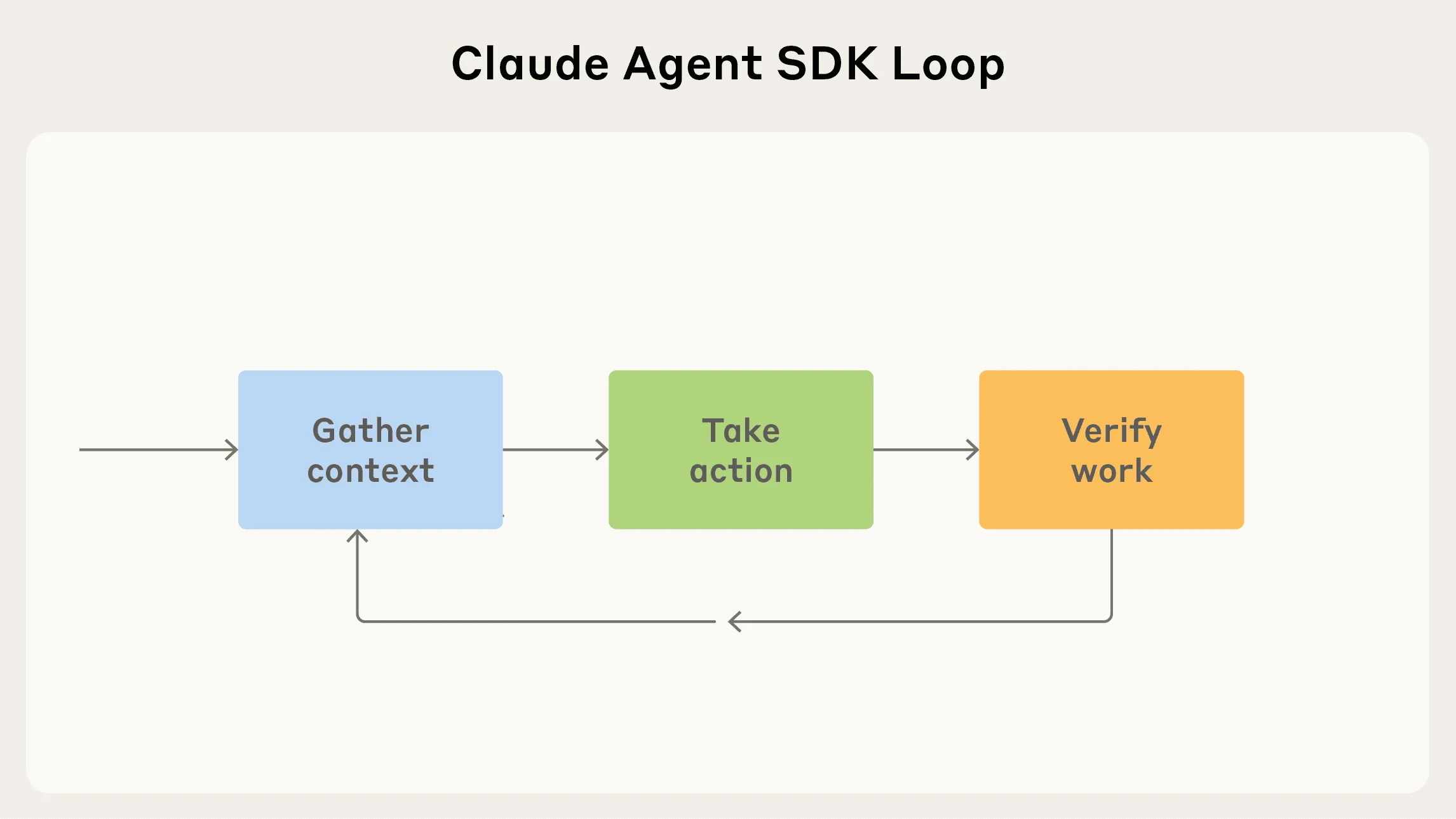
The reason this matters for a law firm is that most of the work you would want to hand off is multi-step, not a single question. Sorting a new client's pile of documents into an organized matter is several steps. Reading a docket and flagging what is due is several steps. Drafting a client letter, then revising it against the file, is several steps. An agent can carry the routine first pass on each, then hand it back for a person to check. I have written before on what agents are and are not, and the short version holds here: this is a clerk you supervise, not a lawyer you trust.
You Do Not Need the API
Here is the part the consultants selling six-figure builds will not lead with. There are two ways to put Claude to work, and they are priced and built completely differently.
The developer API bills per token (a token is about three-quarters of a word), at five dollars per million tokens of input and twenty-five per million of output for the flagship model, per Anthropic's published pricing. Every task you run adds to the meter, and someone has to write and host the code that calls it. That is the right model when you are building a product that serves thousands of requests a day.
The consumer plan is a flat monthly subscription, the same Claude Pro or Max account a partner might already pay for, starting around twenty dollars a month and running to a couple hundred for the heaviest tier. It does not bill per task. And through the Claude desktop app, it runs the same multi-step, agentic work, with no API key and no code.
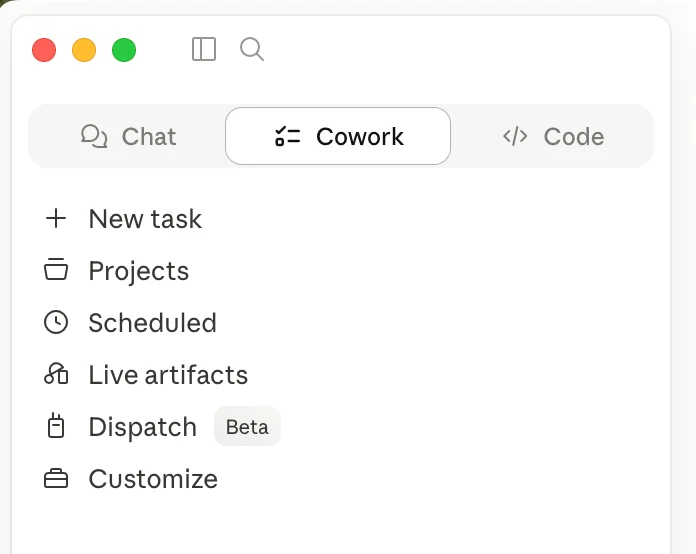
So the cost comparison for a small firm is not subtle. On the API, a busy practice running document work all day pays for every page, every time, plus the developer who built the pipeline and the bill to maintain it. On a flat plan, the same daily work is a fixed line item that does not rise with use. For a firm of five to fifteen people, the flat plan is usually a fraction of the all-in cost of an API build, and you can start this afternoon.
| Developer API | Consumer plan (Pro or Max) | |
|---|---|---|
| Pricing | Per token, per task ($5 / $25 per million) | Flat monthly ($20 to roughly $200) |
| Setup | A developer writes and hosts the code | Download the desktop app and sign in |
| Best for | Building a product or a high-volume pipeline | Running a firm's daily workflows |
| Cost as use grows | Rises with every task | Stays fixed |
| Who maintains it | Your engineer or a vendor | Anthropic |
None of this means the API is bad. It means it is built for a different buyer. If you are a fintech shipping a feature to ten thousand users, you want the API. If you are a practice that wants its intake to stop eating Monday mornings, paying per token and hiring a developer is the long way around. The firms that get value fastest are not the ones who spent the most. They are the ones who picked the simplest tool that did the job.
"There is nothing so useless as doing efficiently that which should not be done at all."
Peter Drucker, on automating the right work before the expensive workWhere Proactive Agents Help a Practice
The point of an agent is not novelty. It is to take a task that quietly burns hours and hand the routine first pass to software, with a person reviewing before anything leaves the firm. Three jobs fit that shape in almost any practice.
Intake. Every new matter starts as a pile: an intake form, account statements, a prior agreement, a few emails, and a note to "let me know if you need anything else." Finding out what is missing means a person reading every page. An agent can take the whole pile at once, list what is there, and flag what is not, before an hour is billed.
SAMPLE CLAUDE PROMPT
"Attached is everything a new client sent for an estate matter: an intake form, three account statements, a prior will, and two emails. Build an intake summary listing every document, what it is, and the key names, dates, and dollar figures. Then give me a missing-items checklist of anything I would normally need that is not here. Flag any figure you are not confident you read correctly and name the page to verify. Do not guess at anything you cannot see."
Deadlines. A proactive agent can run on a schedule, not just when you open it. The desktop app's scheduled tasks can review a docket or a matter list every morning and surface what is due, the same pattern I covered in managed agents for a Wilmette law firm. It does not replace your calendar of record. It is a second set of eyes that never forgets to look.
Client letters. Explaining a notice, a delay, or a next step in plain English is real work, hard to bill, and the basis on which clients judge the relationship. Given a few of the firm's past letters to match its voice, an agent drafts the first version. The attorney reviews, fills in any verified figure, and signs. A letter that took twenty-five minutes from a blank page takes five to review.
How to Start This Week
Pick one workflow you already understand
Choose intake on a single real matter, so you can check the output against a file you know. Do not try to automate the whole firm. Automate one task you could grade by hand.
Run it on the desktop app for a week
Use a flat consumer plan, not the API. Run the agent in parallel with how you do the task now, and compare. You are testing whether the first pass actually saves the second read.
Settle data handling before you scale
Decide which plan, what may go in, and who reviews, before client files become routine inputs. Team and enterprise plans carry stronger data terms than a personal account. Nail this down first.
What This Does Not Replace
The limits are firm, and a fiduciary practice should hold them. An agent does not give legal advice, decide a position, or speak for the firm, and it should never be allowed to. It is not the system of record for a deadline or a dollar figure: those live in your calendar, your practice-management system, and your own verification. Privilege and confidentiality are settled before any client document goes into any tool, not after. Conflict checks stay human. The agent extends a small, careful team. It does not replace its judgment.
The firms that pull ahead this year are not the ones who spent the most on a custom build. They are the ones who picked the simplest tool that did the job, started with one workflow, and kept a person on every output. For most practices on the North Shore, that tool is a proactive agent on a flat plan, not the API.
If you want to work out which workflow to start with, and which plan fits a practice that handles client data, book a free 30-minute AI audit: in person in Lake Forest or on video, no obligation, with a one-page plan to show for it. You can also see how we help firms adopt this without turning it into a software project.
Frequently Asked Questions
Do I need to know how to code to use a proactive agent? +
No. The Claude desktop app runs multi-step tasks from plain written instructions, with no API key and no code. The developer API and code are only needed when you are building a product or a high-volume pipeline, which is a different job than running a firm's daily workflows.
Is a consumer plan really cheaper than the API? +
For a small firm's daily use, usually yes. A flat monthly plan does not bill per task, while the API meters every request and needs someone to build and host the workflow. Anthropic's published pricing puts the API at $5 and $25 per million tokens, against a flat plan that starts around $20 a month. Product-scale volume is where the API wins.
Is it safe to put client files into Claude? +
That depends on which plan you use and how it is configured, and it should be settled before any client document goes in. Team and enterprise plans offer stronger data-handling terms than a personal account. For a practice bound by privilege, this is the first thing to nail down in any rollout.
What is the first workflow a law firm should automate? +
Intake on a single real matter. The output (a document summary plus a missing-items checklist) is easy to grade against a file you already know, so you can judge the value in an afternoon before deciding whether to use it more widely.
Related Articles

Claude Skills Give a Law Firm One AI Standard
One associate gets sharp drafts, another gets generic filler from the same tool. A Claude Skill turns one person's rules into a standard the whole firm can rely on.

Let AI Agents Handle Intake at Evanston Law Firms
Most Evanston firms still run intake on a phone and a Word template. The firms pulling ahead hand the whole new-matter pipeline to an agent, then review its work before anything reaches the client.

Oregon Federal Court Fines Lawyers $110,000 Over AI
Two lawyers were fined $110,000 for filing AI-invented case citations. The lesson is not to avoid AI. It is to verify it. Here is the workflow that prevents it.
About the author

Written by
Michael Pavlovskyi
Founder, Bace Agency
Michael builds custom Claude and GPT workflows for insurance agencies, law firms, and PE firms on Chicago's North Shore. Speaker at Northwestern and Lake Forest College on practical AI adoption for professional services.
Connect on LinkedInSee it in your firm
Book an audit.
A free 30-minute AI audit. No obligation, no pitch deck.
Book a free AI audit