
The Billable Hours Evanston Lawyers Lose Every Day
Most attorneys bill less than 3 hours of an 8-hour day. The rest disappears into admin, intake, and follow-up work that never shows up on a P&L but costs the firm every week.

Key Takeaways
- ✓ According to Clio's 2024 Legal Trends Report, the average attorney bills just 2.9 hours of an 8-hour day. The rest disappears into tasks that are repetitive, well-defined, and almost never tracked as a cost.
- ✓ The lost time rarely shows up on a P&L. It shows up as slower response times, frustrated staff, and partners who cannot explain why the firm is busy but revenue is flat.
- ✓ For Evanston firms competing with downtown Chicago practices, that operational gap is a real competitive problem. Clients who do not hear back fast enough call someone else.
- ✓ The fix is not a technology purchase. It is a workflow redesign. Most firms that ask me for help have the same bottlenecks. They are solvable, and they do not require new staff.
Most partners at small Evanston law firms will tell you they are busy. They are right. Their attorneys are working full days. The calendar is full. The caseload is real. But when you look at what actually gets billed at the end of the week, the number is usually well under half of the hours worked.
This is not a motivation problem. It is not a talent problem. It is a workflow problem. And it does not show up anywhere on a financial statement, which is exactly why it persists.
Your billing report shows revenue collected. It does not show the hours that were worked but never billed, the intake calls that took forty minutes and generated no matter, the conflict check that required three emails, or the engagement letter that sat in a draft folder for two days because nobody had a clean template. Those costs are invisible. But they are real, and they compound every week the firm keeps operating the same way.
Why Evanston Firms Feel This Differently
Evanston is not a generic suburban market. It sits next to one of the most competitive legal markets in the country. A client who hires an Evanston estate planning attorney or a small business lawyer on Church Street is often also considering downtown Chicago options. The difference that keeps them local is usually relationship and responsiveness, not price.
Thomas Demetrio, co-founder of Corboy & Demetrio and one of the most recognized trial attorneys in Illinois history, described this dynamic precisely in a 2023 Lawdragon Hall of Fame interview. He called the interpersonal relationship with the client "one of the great benefits of being a trial lawyer." For firms in Evanston serving long-term clients and professional referral networks, that relationship is the product. Anything that erodes it, including slow callbacks, missed intake windows, and document delays, is not overhead. It is a competitive problem that shows up as lost matters.
That creates a specific pressure. The Northwestern University ecosystem alone generates a steady stream of sophisticated clients: faculty with complex estate situations, researchers starting companies, administrators dealing with employment matters. These are not clients who are patient about unreturned calls or slow document turnaround. They have options.
At the same time, most Evanston firms operate without the associate pool that downtown firms use to absorb administrative work. When a partner at a three-attorney firm spends ninety minutes on intake paperwork, conflict checks, and engagement setup for a new matter, that is ninety minutes that did not go to client work or actual legal analysis. A large Loop firm has a first-year associate for that. The Evanston firm has the same partner.
This is why the operational gap matters more for firms on the North Shore. The margin for wasted time is smaller and the cost of a missed response is higher.
Where the Hours Actually Go
In the same Lawdragon interview, Demetrio made an observation that any working attorney will recognize. He was describing the life of a trial lawyer, but the observation holds across every practice area. Most of a lawyer's day is not the work that justifies the billing rate. The question is whether the hours that fall outside that premium work are being managed deliberately or simply disappearing into process.
"Trial law is not very glamorous. The typical day is spent either in motion court, in depositions, doing everything except performing in front of a jury."
Thomas Demetrio, Corboy & Demetrio, Lawdragon Hall of Fame interview, 2023During the AI audits I have run for North Shore law firms, I ask attorneys to track their non-billable time for one week by category. The results are almost always the same. The lost hours are not random. They cluster in the same six or seven places, every firm.
- Client intake calls. A potential new client calls. The attorney or paralegal takes thirty to sixty minutes on the phone. A fraction of that conversation gets documented. The rest lives in someone's memory until it is entered imperfectly or lost.
- Conflict checks. A new matter cannot open until conflicts are cleared. At many small firms this means searching manually, emailing a colleague, waiting for a response, and documenting the result. A process that should be quick routinely absorbs far more time than it should. It is one of the workflows a law firm can hand to a managed agent.
- Engagement paperwork. Getting a signed engagement letter and retainer involves drafting from a template that is never quite right, sending it, following up, and entering the signed version into the file. This happens at the start of every new matter.
- Document collection. Asking a client to produce documents, following up when they do not, confirming what arrived, and organizing it. This generates email chains that can run for weeks and rarely gets captured in any billable time entry.
- Follow-up emails. Status updates, scheduling requests, responses to routine client questions, reminders about outstanding items. Individually quick. They accumulate into hours across an active docket.
- Appointment scheduling. Back-and-forth to find a time, sending invites, handling rescheduling. At ten to fifteen new matters or meetings per week, it becomes a meaningful drain.
- Billing narratives. Written at the end of a week or month from calendar entries and fragmented notes. Either too vague to survive a client review or twenty minutes per matter to reconstruct properly.
None of these tasks are legally complex. None require a law degree. All of them take time that could otherwise go to client work.
"The most common bottleneck I see at small firms is not the legal work. It is the communication layer around it."
Michael Pavlovskyi, Bace AgencyWhy This Stays Hidden
The reason these costs persist is structural. Law firms track revenue and realization. They track accounts receivable and write-offs. They do not track the hours that evaporated before anything ever got billed.
Partners see a utilization rate below target and interpret it as a people problem: the associates are not working hard enough, the intake is slow, the firm needs to hire. The actual problem is often the opposite. The attorneys are working plenty of hours. Those hours are going somewhere that does not generate billable time.
Most firms start in the wrong place when they think about fixing this. They look at hiring first. Another paralegal, a legal assistant, a receptionist. Sometimes that is the right answer. More often, the underlying workflow is the issue, and adding headcount adds cost without changing how the work moves. I have seen firms double their support staff and still watch their utilization rate stay flat because intake, conflict checks, and billing narratives were all the same as before.
The first step is an accurate picture of where the time is actually going. Not an estimate. A week of tracked non-billable hours by category. That data usually tells the whole story in about an hour of analysis.
What Evanston Firms Are Actually Fixing
The ABA's 2024 AI TechReport found that about 30 percent of attorneys are using AI tools in their practice. But the firms getting real results are not the ones that signed up for the most tools. They are the ones that identified one specific workflow problem and built a solution around it.
For most small Evanston firms, the highest-return starting point is the intake and onboarding process. A structured intake form that handles initial information collection, runs a conflict check, and generates a draft engagement letter can significantly reduce a process that previously required an hour of staff time. The attorney approves the output. The matter opens cleaner.
Billing narratives drafted from approved time entries are the second most common quick win. In my experience running these workflows, the time recovered on billing narratives alone is meaningful, often several hours per attorney per week.
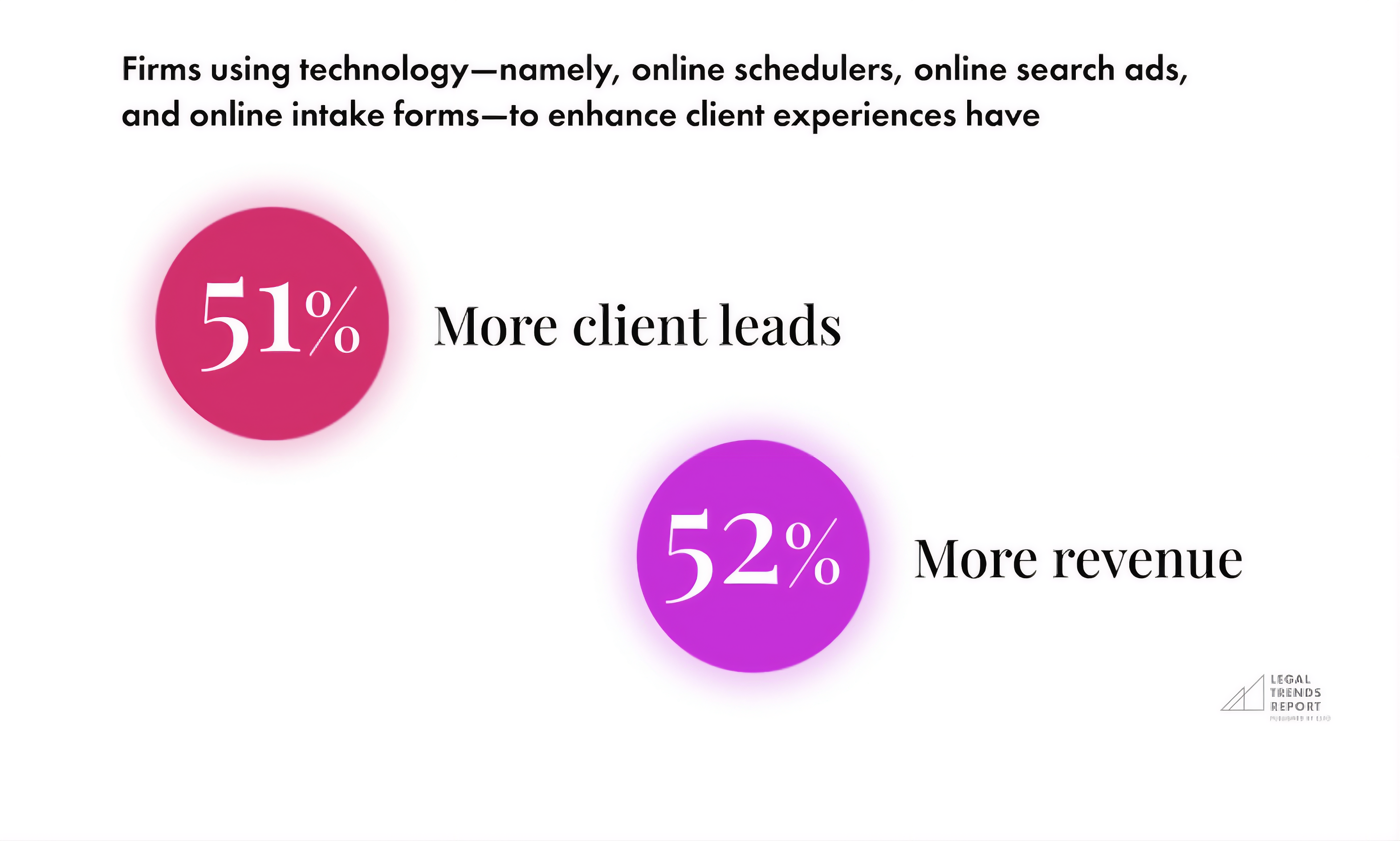
Clio's analysis of its own customers using client intake tools showed 51 percent more client leads and 52 percent higher revenues for those firms. That gap is not primarily about technology. It is about what happens when intake stops being a manual bottleneck: the firm responds at the speed those clients expect.
On client data: ABA Model Rule 1.6 requires reasonable efforts to protect client information. Not every task touches privileged files. Intake, scheduling, and billing narrative drafts from approved entries often work fine on cloud tools. Discovery review and matter analysis with actual client files is a different category. Sort the pile before you choose the tool, and keep the privileged work behind your own wall.
SAMPLE CLAUDE PROMPT
"I run a [practice area] law firm in Evanston. Here is a list of tasks my team handles each week: [paste your list]. For each one, tell me: (1) whether it touches privileged client files, (2) whether it is repetitive enough to automate, and (3) what the review step should look like before any output leaves the firm. Sort from easiest to hardest. One sentence per task."
Three Steps to Get Moving
Track non-billable time for one week, by category
Have every attorney and paralegal log where non-billable hours go: intake, conflict checks, engagement paperwork, document collection, follow-up emails, scheduling, billing narratives. Do not estimate. Log in real time. Most firms find two or three categories account for most of the gap. Those are the starting point.
Sort your task list by whether it touches privileged files
Separate into two piles: tasks that process client matter files, and tasks that do not. The second pile can start on a cloud AI tool today. Do not let it wait while you figure out the first.
Fix one workflow for thirty days before touching another
Pick the single most tedious task. Add a human review step before anything goes to a client. Run it for a month and measure whether it saves the time you expected. Every firm I have seen try to automate five workflows at once has ended up with none working reliably.
The problem is not your lawyers. They are working. The problem is where the day disappears before it ever reaches a time entry. Intake calls that do not open matters. Conflict checks that turn into email threads. Engagement letters that sit in drafts. Follow-up emails that accumulate across twenty open matters. None of it shows up as a cost on any report. All of it costs the firm, every week.
The firms on the North Shore that are getting ahead operationally are not the ones that spent the most on technology. They are the ones that looked honestly at where the hours go, picked the most painful process, and fixed that one thing first.
If you want to see what that picture looks like for your specific practice, a free 30-minute AI audit is the right starting point. In person in Evanston or by video. The output is a one-page list of which workflows to fix first, which to skip, and what infrastructure your work actually requires. No pitch, no obligation.
Frequently Asked Questions
Which tasks are easiest to automate first in a small law firm? +
In the AI audits I have run for North Shore firms, the highest-return starting points are almost always intake form processing, billing narrative drafts from approved time entries, and engagement letter generation. These are repetitive, have well-defined inputs and outputs, and carry an obvious human review step. None require legal judgment.
Does using AI for legal work create issues with attorney-client privilege? +
ABA Model Rule 1.6 requires reasonable efforts to protect client information. For cloud AI tools, the answer depends on the vendor's data processing agreement. For on-premise tools, the data never leaves your building. Sort tasks by whether they touch privileged files before choosing any tool. Many high-value starting workflows do not require privileged data at all.
How long does it take to set up an AI workflow for a law firm? +
A single well-scoped workflow typically takes one to two weeks to set up, test, and train staff on. The first is always slower because you are working out the review process and edge cases. The second usually takes half as long.
What does AI automation cost for a small law firm? +
The cost depends on four variables: cloud tools versus private on-premise deployment, number of users, complexity of the workflows, and whether you build internally or bring in outside help. Cloud tools for non-privileged workflows are the lowest-cost entry point. On-premise deployment resolves data residency questions but requires a larger upfront investment. We break down the drivers in the real cost of an AI project.
Related Articles

Claude Skills Give a Law Firm One AI Standard
One associate gets sharp drafts, another gets generic filler from the same tool. A Claude Skill turns one person's rules into a standard the whole firm can rely on.
Let AI Agents Handle Intake at Evanston Law Firms
Most Evanston firms still run intake on a phone and a Word template. The firms pulling ahead hand the whole new-matter pipeline to an agent, then review its work before anything reaches the client.
Oregon Federal Court Fines Lawyers $110,000 Over AI
Two lawyers were fined $110,000 for filing AI-invented case citations. The lesson is not to avoid AI. It is to verify it. Here is the workflow that prevents it.
About the author

Written by
Michael Pavlovskyi
Founder, Bace Agency
Michael builds custom Claude and GPT workflows for insurance agencies, law firms, and PE firms on Chicago's North Shore. Speaker at Northwestern and Lake Forest College on practical AI adoption for professional services.
Connect on LinkedInSee it in your firm
Book an audit.
A free 30-minute AI audit. No obligation, no pitch deck.
Book a free AI audit